
The digital state variable filter was described in Hal Chamberlin’s Musical Applications of Microprocessors. Derived by straight-forward replacement of components from the analog state variable fiter with digital counterparts, the digital state variable is a popular synthesizer filter, as was its analog counterpart.
The state variable filter has several advantages over biquads as a synthesizer filter. Lowpass, highpass, bandpass, and band reject are available simultaneously. Also, frequency and Q control are independent and their values calculated easily.
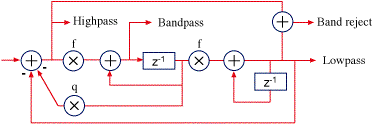
The frequency control coefficient, f, is defined as

where Fs is the sample rate and Fc is the filter’s corner frequency you want to set. The q coefficient is defined as

where Q normally ranges from 0.5 to inifinity (where the filter oscillates).
Like its analog counterpart, and biquads, the digital state variable has a cutoff slope of 12 dB/octave.
The main drawback of the digital state variable is that it becomes unstable at higher frequencies. It depends on the Q setting, but basically the upper bound of stability is about where f reaches 1, which is at one-sixth of the sample rate (8 kHz at 48 kHz). The only way around this is to oversample. A simple way to double the filter’s sample rate (and thereby double the filter’s frequency range) is to run the filter twice with the same input sample, and discard one output sample.
As a sine oscillator
The state variable makes a great low frequency sine wave oscillator. Just set the Q to infinity, and make sure it has an impulse to get it started. Simply preset the delays (set the “cosine” delay to 1, or other peak value, and the other to 0) and run, and it will oscillate forever without instability, with fixed point or floating point. Even better, it gives you two waves in quadrature—simultaneous sine and cosine.
Simplified to remove unecessary parts, the oscillator looks like this:

For low frequencies, we can reduce the calculation of the f coefficient equation to

Here’s an example in C to show how easy this oscillator is to use; first initialize the oscillator amplitude, amp, to whatever amplitude you want (normally 1.0 for ±1.0 peak-to-peak output):
// initialize oscillator
sinZ = 0.0;
cosZ = amp;
Then, for every new sample, compute the sine and cosine components and use them as needed:
// iterate oscillator
sinZ = sinZ + f * cosZ;
cosZ = cosZ – f * sinZ;
The sine purity is excellent at low frequencies (becoming asymmetrical at high frequencies).
Great article. Will try it. Like the idea of a filter that does not need complex volume and frequency corrction tables. Always used some type of biquad filters. Keep posting 🙂
Very nice post, Nigell! Could you please develop the 4th (and possible the 8th) order digital SVF. The following paper presents the development for the analog 4th SVF:
DENNIS A. BOHN, “A FOURTH-ORDER STATE VARIABLE FILTER FOR LINKWITZ-RILEY ACTIVE CROSSOVER DESIGNS” in AES Convention:74 (October 1983)
First, most higher-order filters are made by cascading lower-order filters—this is done to reduce the precision necessary for the higher-order poles. For instance, you can use two of these second-order SVFs in series for a fourth-order filter. The Moog-style digital filters are made from four first-order filters.
One key consideration in a synthesizer filter is how well it behaves when frequency (and perhaps resonance) are changed quickly; that’s why we don’t use direct form biquads as synthesizer filters. I hope to find time to write an article on an improved SVF suitable for synthesizers for an upcoming post.
I’m designing a synthesizer with a biquad that accepts a 1/q value (I considered hardwiring it as a Butterworth) and can have its frequency driven by an LFO. The output of either phase modulation or an alias-suppressed trivial waveform generator is the input. That’s bad?
By the way, testing this for 60 seconds at 96,000Hz fs with a 300Hz f0 and an amplitude of 1 gives me a maximum sine value of 1.0000481949464535 and appears to be stable. That little extra tacked on the end is a tiny amount.
Cascading two 2nd order state-variable filters (SVF) is indeed straightforward. The result, however, does not feature the expected 4th order LP/HP/BP/BR simultaneous outputs — rather, only one of the outputs is as expected.
Without loss of generality, let’s assume that the LP output of the SVF I is connected to the SVF II input. In such case, it is true that one has at the LP output of SVF II the expected 4th order lowpass filter, however the remaining SVF II outputs are LP-XX cascades of little meaning or use. The same applies to the HP, BP, and BR.
Being mostly focuseded on implementing a time-invariant 4th order crossover using a single 4th order SVF, I look after topology in which the complementary 4th order low and highpass outputs are simultaneously available.
OK, I see now that your goal is a crossover and not a lowpass synth filter. I suggest focusing your search on “Linkwitz-Riley” in particular, rather than fourth-order state variable.
Isn’t there a delay in the output back to input line missing?
There just needs to be a delay somewhere in the loop, as you can see in the diagram. I’ll try to present a more modern, improved version in the future.
“The main drawback of the digital state variable is that it becomes unstable at higher frequencies.”
Is this an advantage over biquads for low frequency filters? Biquads work fine at high frequencies, but are supposed to be implemented in extra precision at very low frequencies because they have numerical problems, while SVF need special attention at high frequencies but work well at low frequencies?
Numerically, this state variable filter is very good at low frequencies (the direct form biquads aren’t). There are ways to improve the Chamberlin state variable. The most obvious is oversampling, with a cheap and dirty version being to simply run the filter twice (with the same input) and discard the first result. Andrew Simper shows how to use trapezoidal integration for much-improved version of the state variable filter: http://www.cytomic.com/technical-papers
Hi Nigel,
I’ve been a huge fan of your site whilst on my journey to develop some digital synth’s and you’ve been kind enough to even help me with a question or two in the past.
I was wondering if you had any plans to do an article on the implementation of a working SVF ?
I’ve managed to build up a fairly decent understand of IIR filters and biquads etc but want to implement a filter that responds well to parameter changes and modulated cuttoff controls etc.
Your WaveTable oscillator class was an absolute gold mine and gem of a read for a dsp newbie like myself and gave me hope again whilst implementing my own synth!
Is anything similar in the pipeline for an svf ?
Failing that would you or anyone else reading happen to know of any resources that provide a well explained example of implementing a SVF in c++ and caculating the various coefficients etc ?
Huge thanks again for sharing all your know how.
Josh
Hi Josh,
Yes, with an ADSR and wavetable oscillator, it would be nice to have a high-quality synth filter article, wouldn’t it? I have a few things in the pipeline, but I can point you to a terrific implementation of the SVF, from Andrew Simper. The main paper is here: http://cytomic.com/files/dsp/SvfLinearTrapOptimised2.pdf. Here’s the index page, with links to other filter article: http://cytomic.com/technical-papers.
Nigel
This article represents an outstanding introduction to a very deep topic. In reality, these SVFs are actually digital waveguides, which can be used to generate waveforms of artbitrary complexity. Carried to the extreme, these kinds of digital waveguides lead to physical modeling, a system able to reproduce acoustic instruments with eerie accuracy (as well as able to model analog circuits, with some slight changes).
I hope you plan to go into a lot more depth on this subject, because it’s of tremendous importance now that CPUs and DSP chips have gotten fast enough to run IIR filter code in real time. Synths like the Nord modular or the Yamaha VL-1 use this kind of code to produce amazing sounds.
See Julius O. Smith III’s article “Digital Waveguide Architectures for Virtual Instruments” for a lot more detail.
I am student from INDIA.i want to know what is gain constant,pole frequency and pole selectivity generally..and for state variable filter how it will derived from transfer function? i am weak in this area..can u clarify it??
I just wanted to stop by and say thank you for this really informative article. It’s most helpful!
Something doesn’t look quite right. . .
An op-amp state variable consists of two cascaded identical integrators (one which produces BP output followed by one which produces LP output) with an adder to close the loop. The BP output goes into the input to the second integrator. In your digital implementation the input to the second integrator comes from the output of the delay, not the BP output. Would that make a difference?
Right. The reason is that it would be a delay-free loop (the output of the first thing depending on the output of the second thing that depends on the output of the first…). There are better ways to go, at the expense of a little more computation, such as Andrew Simper’s version with trapezoidal integrators (search for andrew simper state variable). Also, you might come across “zero-delay feedback” filters, which aren’t really a delay-free loop, but try to approximate one with more computation.
Thanks. I’ll have a read.
I also found your explanation in Hal Chamberlain’s book.
I was expecting BOTH delays in the loop, as it seemed more like the two cascaded integrators in the analogue version.
Great article.
You write that the sine oscillator “will oscillate forever without instability, with fixed point or floating point.”
Can you prove the sine oscillator is guaranteed stable no matter the precision used?
How can you be sure it will always be stable?
The background for asking this is that I started out implemented the sliding Goertzel algorithm using IIR direct form 2 for the resonator. For sliding Goertzel, the poles are always on the unit circle and the filter is marginally stable. Even when using double precision floating point, the output slowly drifts. The problem is a limited precision accumulator.
One solution to this problem is to move the poles inside the unit circle (and move the cancelling zeros). In that case, I would have to figure out how much the poles had to be moved for the direct form 2 realization to become stable. Of course, I could always just move the poles longer than needed to be on the safe side but it would be a lot better to know the exact requirement. Any hints/links to relevant articles would be appreciated.
Then the sliding goertzel was implemented with the resonator in state variable form, like described in this article. When the resonator is realized by using the state variable structure, the bandpass output is used and q is zero (infinite Q), making it similar to the sine oscillator. In this case, the resonator seems to be stable with both single and double precision floating point. However, I do not know if it really is stable or I just have not tested with an input that provokes the instability. If I could prove that the output is guaranteed stable, I can keep Q at infinity, otherwise I will have to find a suitable Q that guarantees stability for a given precision.
Finally I have not considered floating point denormals and how it affects performance but stability issues come first.
I have only a superficial familiarity with sliding Geortzel, having seen articles and discussion, but had no need. I can’t point you to anything you haven’t already web-searched for (this seems like a nice overview of issues, by Eric Jacobsen and Richard Lyons: The Sliding DFT). The comp.dsp group would be a good place to ask.
Thanks Nigel. I will try that.
Could you elaborate on how you can be certain that the sine oscillator mentioned in your article will be stable regardless of using floating or fixed point?
Chamberlin asserts the amplitude stability with integers in his book, though from observation (he tested with 8-bit arithmetic). I believe I read later that it was true of floating point as well. I’ve never tried to prove it.
Hello Nigel,
great article, thank you very much.
One thing I’d like to know is, if I can plot the SVF somehow like you did it with the biquad filter and how would yo do that?
Thank you
David
The biquad calculator is done by calculating the response around the unit circle based on pole and zero positions dictated by the biquad coefficients. While the SVF is fundamentally equivalent, I can’t tell you an easy way to modify what I have for that, offhand. But plotting the response of and arbitrary system is pretty easy: Start with a system initially internally to zero (or run a string of zeros through it—not necessary for an SVF with the delays zeroed), then a “1” (anything non-zero, especially if your code is floating point), followed by more zero samples. Then take an FFT of the output and plot it. Longer FFTs will have better frequency resolution, and there’s the caveat that lower filter features (a lowpass set to a low cutoff frequency) naturally have a longer decay time, but as long as the FFT isn’t too short (poor plotting resolution anyway), you can get a pretty good picture without bothering to window. To check the SVF, pick an FFT size that fits the number of horizontal pixels on your graph (2048 or 4096, say) and that should give you decent results.
Thank you! That really helped me.
Great article. I already experimented with IIR Oscillators and now you served this one. I was very curious and tried out the state variable oscillator. Turns out that it’s very efficient and accurate. I cannot confirm asymmetries at high frequencies, instead there is an exponential raise in the amplitude when raising frequency, which leads to complete instability at half of Nyquist.
But an even very interesting is, that the svo if capable of frequency modulation! As long as the mod signal is continuous, the osc seems stable even when modulated quickly.
Agreed, it’s a very well-behaved oscillator. Basically, the issues start when the gain factor f = 2 * sin(pi * fc/fs) becomes greater than 1, which is above a sixth of the sample rate, a third of Nyquist.
I think there may be an error in the first diagram regarding the outputs from the band pass integrator? Shouldn’t the [Z-1] block be placed in the feedback path like you’ve done for the LPF integrator? It seems inconsistent. Please correct me if I’m wrong.
Yes, you can. But it increases the loop delay. Basically, you have a choice of no delays in the loop (which won’t work—you’ve have to use a value that hasn’t been calculated yet), one delay, or two delays. Each delay compromises the filter, less so with one. In Filters for synth—starting out, I mention a better SVF by Andrew Simper that doesn’t have the shortcomings of the Chamberlin SVF.